
November 20, 2021
By: Cameron Korth, Owner – 1st Rate I.T. Services
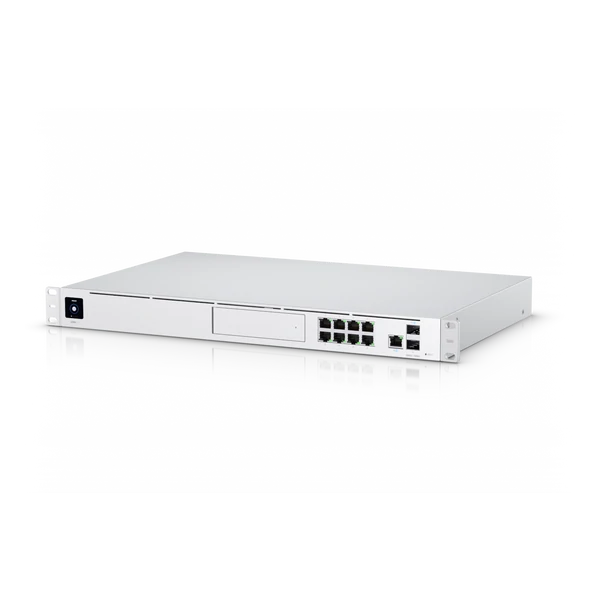
Today we will be taking a look at the UniFi Dream Machine Pro (UDM-Pro) by Ubiquiti Networks. The name is not to be taken lightly, as this machine packs a lot of speed and processing power, not to mention all the nice add-ons and beautiful User Interface created by Ubiquiti’s team of software engineers.
The UDM-Pro comes pre-installed with Ubiquiti’s full suite of applications; UniFi Network, UniFi Protect, UniFi Talk, and UniFi Access.
Let’s take a look at what each of these applications and their functions’:
UniFi Network- The Network Application hosts your Layer 3 Firewall and handles all WAN and LAN traffic coming into and out of the UDM-Pro. The UDM-Pro has a max Throughput of 3.5 Gbps- that’s incredible.
UniFi Protect- Ubiquiti’s line of PoE Security Camera’s can be configured, monitored, and managed through the built-in ‘Protect’ application.
UniFi Talk- Ubiquiti’s hosted VoIP Phone solution. I have not personally tested this line of products- yet.
UniFi Access- Ubiquiti’s Access Management application hosts and manages UniFI Access devices and hubs. These are integrated with building access systems implementing features such as NFC Access Cards & NFC Tag Readers.
The Dream Machine Pro comes packed with a powerful 1.7 GHz quad-core processor.
One major are the UDM-Pro is lacking in is the quantity of PoE ports; there aren’t any. Personally, I feel this was a major design flaw on Ubiquiti as PoE ports are very commonly used for devices such as security cameras, VoIP telephones, POS Workstations, credit card terminals, and so many others.
However, the UDM-Pro does include x2 10 Gbps SFP+ Ports. You can use the secondary WAN SFP+ Port and configure an auto-negotiating fail-over connection utilizing a secondary WAN uplink.
The UDM-Pro also comes with a standard 3.5” HDD-Bay which is where the UniFi Protect Application and its’ footage will be stored and viewed from. Sadly, the UniFi Dream Machine Pro does not come with a hard drive included.
However, if you’re looking for an option that has a hard drive pre-installed, you might take a look at the UniFI CloudKey Gen2 Plus which comes with a 1 TB HDD, which can be easily upgraded to a compatible 5 TB model for longer storage retention.
Ensure you are choosing a hard drive for the Dream Machine Pro, make certain the drive you’re selecting has been designed to be used in either a NAS or Network Video Recorder (NVR).
* Personally I am fond of and recommend the West Digital RED NAS 8 TB Hard Disk Drive’s. I use them in all my personal and some of my clients’ deployments. I’ve never had a drive failure or any HDD issues with the UDM-Pro. *Fingers Crossed*
Threat Management Features
– IDS/IPS Scans in the following categories:
* Virus and Malware
* Botnets, Trojans and Worms
* P2P
* Hacking or Malicious IP Addresses
* TOR
* Attacks Against Network Protocols (SSH)
– Internal Honeypot (Awesome Feature!)
– Internal Threat Scanner
These are some pretty nifty features, especially for the SOHO Office User or Small to Medium-Sized Business.
I highly recommend the UniFI Dream Machine Pro with 5 out of 5 Stars. It has been a phenomenal product and workhorse since the day I plugged her in. Kudos to Ubiquiti.